


Calendar - Easy Planner
4.6600.00 Reviews
App Specs
- Version
- 3.6
- Updated On
- License
- Free
- Downloads
- 1,000,000+
- Developer
- Glad Appvestor
- Categories
- Productivity
- Platform
- Android
Screenshots
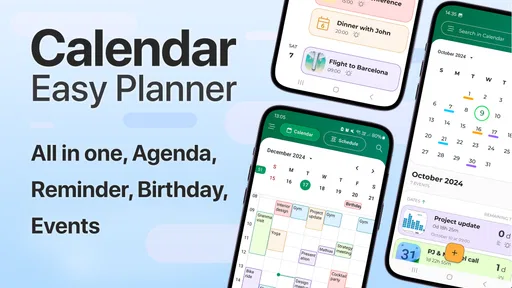
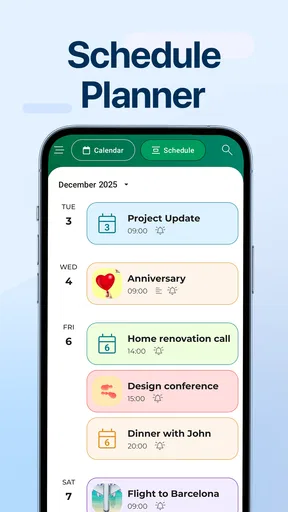
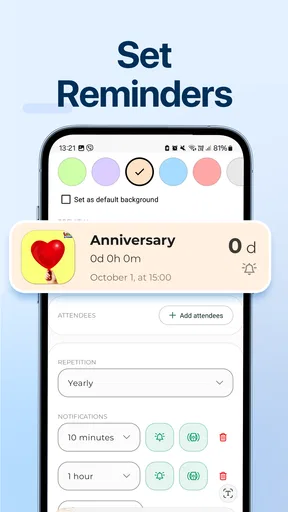
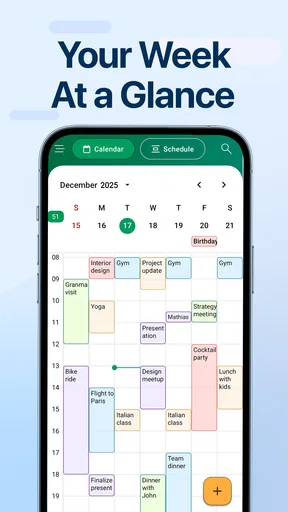
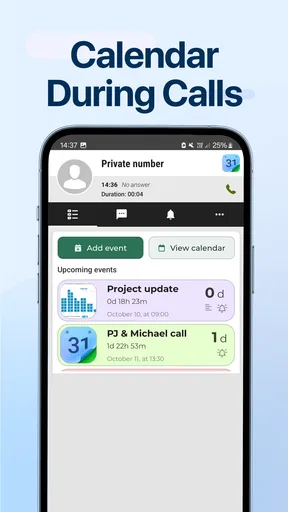
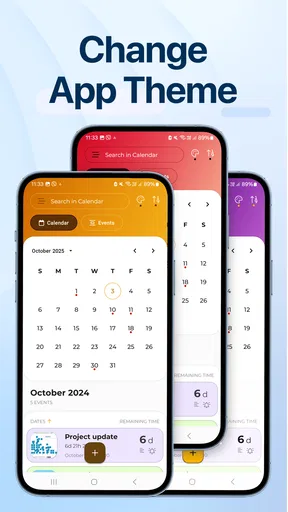
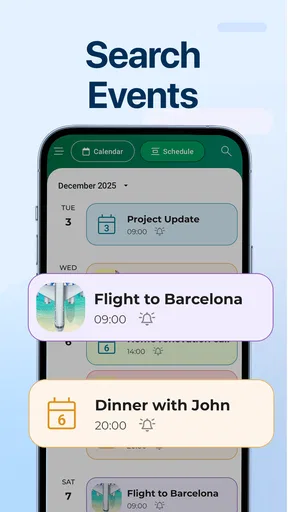
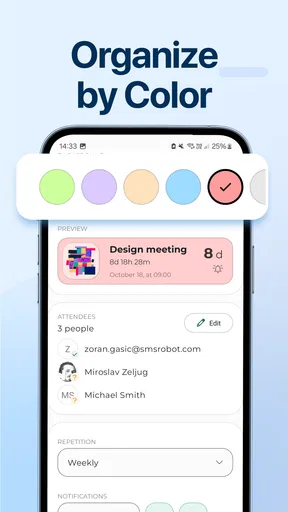
 Analysis by AppCompare
Calendar - Easy Planner is the kind of productivity app I reach for when I want a clear view of my day without turning planning into another project. After using it as a straightforward calendar and reminder tool, my main impression is that its value comes from keeping attention on appointments, tasks, and timing rather than surrounding them with unnecessary complexity. It is free to start, aimed at everyone, and sits comfortably between a paper planner and a feature-heavy digital workspace.
My overall view is positive, with one important qualification: this is best understood as a simple personal planning app, not a complete work-management system. If your daily life involves classes, errands, appointments, birthdays, recurring obligations, or basic time blocking, it can be a sensible choice. If you need advanced collaboration, elaborate project tracking, or a deeply customizable calendar environment, a more specialized alternative may suit you better.
How Calendar - Easy Planner feels in everyday use
The app comes from Glad Appvestor and belongs to the productivity category, but it does not feel like it is trying to compete with every productivity tool at once. Its purpose is easier to understand: put plans in one place, make upcoming commitments visible, and help you remember what needs attention. That narrow focus is a strength because it reduces the temptation to spend more time organizing a system than actually following it.
I found the most useful way to approach it was to treat the calendar as a daily control panel. I would look ahead, identify fixed appointments, and then add the reminders or flexible activities around them. That order matters. Instead of filling every open space with ambitious tasks, I could see where the day was already committed and make a more realistic plan.
A normal weekday shows why this approach works. Imagine having a morning appointment, a work or study block, a grocery stop, and a call in the evening. The calendar gives those commitments a visible sequence, while reminders help prevent the small items from disappearing between larger events. The benefit is not dramatic automation; it is the simple relief of no longer relying on memory for every detail.
The app is also approachable for someone who has never maintained a digital calendar. The store presents it as a calendar for planning, scheduling, and reminders, and that description matches the experience more closely than a grand promise about transforming your entire routine. I would recommend starting with only the events that genuinely matter. Once those are dependable, add smaller reminders selectively rather than turning every thought into an alert.
A practical workflow for busy days
My preferred workflow begins the night before. I check the next day, place fixed commitments first, and then add one or two flexible tasks that can realistically fit around them. For a parent, that might mean school-related timings, a shopping reminder, and an evening obligation. For a student, it could mean a lecture, a study session, and a deadline reminder. For someone working shifts or appointments, the same structure helps separate immovable events from preparation tasks.
Worth Reading Before You Choose

EA SPORTS FC Mobile 26 Is a Bigger Football Game, but It Takes Time

Flipboard Shows What News Apps Must Do Beyond the Feed

Switching to Android Auto Means Rethinking Your Driving Routine

Google Calendar Makes a Crowded Week Easier to Manage

Ludo King Makes the Most of the Minutes Between Plans

Baby Panda World Brings Quick Play to Modern Phones, but Its Game Library Feels Busy
One useful habit is to write reminders as actions rather than vague labels. “Prepare documents” is more useful than “documents,” while “buy ingredients for dinner” gives a clearer prompt than “shopping.” This is not a flashy feature, but it changes how helpful the notification feels when it appears. The app becomes a practical prompt instead of a storage box for incomplete thoughts.
I also prefer using different planning horizons for different types of information. I keep the calendar focused on things tied to a time or date, and I use reminders for actions that need attention but do not deserve a rigid slot. Mixing both indiscriminately can make a day look crowded and create alert fatigue. Calendar - Easy Planner works better when each entry has a clear reason for being there.
That distinction is especially valuable for people who tend to overplan. A calendar can make an empty afternoon look like unused capacity, but empty time is often needed for travel, breaks, unexpected calls, or simple recovery. I would leave breathing room around important commitments rather than stacking events edge to edge. The app makes that judgment visible, but the judgment still belongs to the user.
Where the simple approach is genuinely strong
The strongest part of the experience is its low mental overhead. Many productivity apps ask users to learn projects, labels, workflows, dashboards, or multiple views before the system becomes useful. Here, the basic idea is much easier to grasp: record what is happening, check what is next, and use reminders for things you might otherwise forget.
That simplicity is particularly helpful during transitions. If I am moving from a paper notebook to a phone-based planner, I do not need to redesign my entire life before getting started. I can enter the next appointment, add a reminder for preparation, and build confidence gradually. Likewise, someone who has abandoned complicated calendar systems may find a smaller routine easier to maintain.
Another strength is that the app can support both planning and review. Looking at the day in advance helps with preparation, while checking the calendar afterward can reveal whether the schedule was realistic. If every day becomes overloaded, that is a sign to reduce commitments or add more space. A calendar is not only a reminder device; used honestly, it is feedback about how time is being spent.
The public response also suggests that the basic proposition connects with many users. It has an average rating of 4.6 from around 4.7 thousand ratings, and its reach has passed one million installs. Those figures do not prove that it will fit every workflow, but they do indicate that the straightforward planning idea has found a substantial audience.
Small planning techniques that make a difference
One technique I recommend is pairing an event with a preparation reminder. If an appointment requires documents, travel, or a phone call beforehand, the appointment alone is not enough. A separate prompt placed earlier gives the task a chance to happen before the deadline. This is more reliable than expecting a single calendar entry to carry both the event and all the work around it.
A second technique is to use the calendar for decisions that have a real time boundary, not for every item on a wish list. A reminder to call a service provider makes sense when it needs to happen during opening hours. A vague ambition such as “learn a language” needs a smaller action and a realistic time. Turning broad goals into specific appointments or reminders makes the system more honest and easier to follow.
A third technique is a weekly cleanup. I would remove obsolete reminders, adjust anything that repeatedly gets ignored, and look for events that no longer need alerts. This matters because an overloaded reminder system gradually loses authority. When every notification feels equally urgent, none of them stands out. Keeping the calendar selective is part of making it useful.
There is also a subtle trade-off between visibility and privacy. The more detail an entry contains, the more useful it may be later, but a lock-screen notification or shared glance at the phone can expose more than intended. I would use concise wording for sensitive appointments and keep detailed notes elsewhere when necessary. That is good calendar practice in general, but it is especially relevant when the app is used as the central record of a personal schedule.
The meaningful limitation: simplicity has a ceiling
The same restraint that makes the app approachable can become a limitation for advanced users. People who need a shared household calendar, team coordination, project dependencies, detailed task hierarchies, or sophisticated scheduling rules may eventually find the experience too narrow. A dedicated collaboration platform or a more established calendar ecosystem would be a better fit in those cases.
This is not a criticism of the app failing to be something else. It is a reminder to choose the right tool. A personal planner can be excellent at showing what I need to do today while still being the wrong place to coordinate a department, manage a complex launch, or track a large collection of interdependent projects.
There is also a behavioral weakness worth mentioning: a simple calendar cannot rescue an unrealistic schedule. If I enter too many commitments, the screen may look organized while the day remains impossible. The app helps expose conflicts and forgotten tasks, but it does not make travel time, interruptions, or fatigue disappear. Users who expect automatic prioritization or a fully guided planning method may need more than this app offers.
Cost is another point to consider. The app is free to download and use as a starting point, but optional in-app purchases range from $2.99 to $39.99 per item. That broad range means I would review the purchase screen carefully before committing to anything, especially if I only need basic calendar functions. The free entry point is appealing, while the value of paid options depends on whether their added capabilities match the way you plan.
The current version is 3.5, and the app supports devices running at least OS 10. For most people using a reasonably current Android or iOS device, that requirement should be easy to check before installing. I would still confirm compatibility on the specific phone or tablet, particularly if it is older or has limited system support.
Who should use it, and who should skip it
I think Calendar - Easy Planner is a good match for people who want a personal schedule they can understand immediately. It suits students balancing classes and study time, families managing appointments and errands, freelancers organizing client commitments, and anyone who regularly forgets small but important tasks. It is also a reasonable first step for someone moving away from a paper planner without wanting a complicated digital system.
It can be especially helpful for users who need structure but dislike productivity jargon. You do not need to think in terms of elaborate workflows to benefit from it. A few well-written calendar entries and carefully chosen reminders can create a dependable routine. The app is also appropriate for an all-ages audience, reflected in its Everyone content rating, so its appeal is not limited to a narrow professional group.
I would skip it if your main requirement is intensive teamwork. A shared family schedule might be possible depending on the workflow you choose, but I would not select this app solely on the assumption that it will replace a purpose-built collaboration service. Likewise, people who need detailed project boards, advanced reporting, or complex recurring logic should compare it with tools designed around those needs.
I would also hesitate to recommend it to someone who wants a calendar to make every planning decision automatically. The app is better for recording and reviewing your choices than for acting as a personal operations manager. If you enjoy controlling the structure of your planning, that can feel refreshingly direct. If you want the software to prioritize, reschedule, and coordinate everything for you, another option will probably be more satisfying.
How it compares with familiar alternatives
Compared with a paper planner, the phone-based format is more convenient for reminders and last-minute changes. Paper can feel calmer and more flexible for free-form notes, but it cannot actively prompt you when a commitment is approaching. Calendar - Easy Planner makes more sense when forgetting is the main problem; paper may remain better for people who think visually and enjoy writing longer reflections.
Compared with a large ecosystem calendar, this app’s appeal is its focused identity. A widely integrated calendar may be preferable if your work, school, contacts, email, and shared events already live together elsewhere. The advantage of Calendar - Easy Planner is that it can serve as a dedicated planning space rather than another component of a broad account-based system.
Compared with a task manager, the difference is the importance of time. A task manager is usually stronger for lists, priorities, and project breakdowns, while a calendar is stronger at answering, “When will this happen?” I would use this app for appointments and time-sensitive reminders, then choose a task-focused alternative when a project contains many steps that do not belong on a daily schedule.
That division can prevent a common mistake: putting every task on the calendar and then feeling behind before the day begins. Calendar - Easy Planner works best when it shows the shape of the day, not every possible thing you might do. For larger goals, I would keep the project detail elsewhere and place only the next meaningful action into the schedule.
What to know before downloading
The app was released on November 29, 2024, and its free starting price lowers the barrier to trying it. I would spend a few days testing a small routine rather than importing every appointment immediately. Add the commitments you cannot afford to miss, create preparation reminders for the most important ones, and see whether the notification rhythm helps or distracts you.
During that trial, pay attention to three questions. Can you find the next event quickly? Do reminders arrive at a useful moment rather than an annoying one? And does reviewing the day help you make better decisions, or does it simply create another list to maintain? The answers matter more than a long feature checklist because a planning app succeeds only when you keep using it.
It is also worth deciding in advance what belongs in the app. I would not use it as a storage place for every note, idea, or long-term ambition. Its clearest role is to connect a date, a time, or a timely prompt with something I genuinely intend to do. That boundary keeps the calendar readable and makes important reminders easier to trust.
My final recommendation
After using it as a personal planning tool, I see Calendar - Easy Planner as a practical choice for people who value clarity over feature density. Glad Appvestor has kept the central idea easy to understand: schedule what matters, remember what needs attention, and review the day without building a complicated productivity machine.
My recommendation is strongest for individuals, students, families, and independent workers who want a simple calendar with reminders and are willing to manage their own priorities. I would be more cautious for teams, project-heavy users, and anyone seeking deep automation or collaboration. The optional purchases, ranging from $2.99 to $39.99 per item, are another reason to begin with the free experience and judge whether the extra value is relevant to your routine.
In the end, this app succeeds when you use it as a calm, selective record of real commitments. Keep entries specific, leave space between them, connect important events with preparation prompts, and clean up reminders regularly. Follow that approach and it can become a dependable everyday companion. Expect it to replace a full task-management or teamwork platform, however, and its simplicity will feel more like a restriction than an advantage.
Pros
- Simple calendar layout makes daily planning quick and easy.
- Recurring events help manage regular appointments and routines.
- Clear reminders reduce the chance of missing important tasks.
- Lightweight design should run smoothly on most Android devices.
- Useful for users who prefer a focused planner without social features.
Cons
- Advanced collaboration tools may be limited or unavailable.
- Customization options for colors and calendar views can feel basic.
- Some features may require permissions that privacy-focused users dislike.
- Large schedules can become harder to manage without stronger filtering.
- The experience may feel too simple for professional project planning.
FAQs for Calendar - Easy Planner
What is Calendar - Easy Planner, and who is it designed for?
Calendar - Easy Planner is a scheduling and organization app designed to help users manage appointments, tasks, reminders, and important events in one place. Its straightforward layout makes it suitable for students, professionals, families, and anyone who wants a clearer overview of daily or monthly commitments. It is especially useful for people who prefer a simple planner without an overwhelming number of advanced features.
Can I use Calendar - Easy Planner to create reminders and recurring events?
Yes, the app is intended for organizing both one-time and repeating activities. You can generally add an event with a title, date, time, and additional details, then use reminders to receive notifications before it begins. Recurring schedules can be helpful for weekly classes, meetings, workouts, medication routines, or household responsibilities. Before relying on notifications, check your device permissions and battery-saving settings.
Does Calendar - Easy Planner synchronize with other calendars or devices?
Synchronization depends on the version of the app and the platform on which it is installed. Some releases may work as an independent planner, while others can connect with a device calendar or supported account. If access to existing appointments is important, review the app’s permissions and settings after installation. Also confirm whether changes made on one device appear on another before using it as your only calendar.
Is Calendar - Easy Planner free to download, and are there advertisements or in-app purchases?
The app may be available to download at no initial cost, but availability of advertisements, premium tools, or in-app purchases can vary by operating system, region, and app version. Users should check the current store listing for the exact pricing information before downloading. If the app offers optional paid features, the basic planner may still be sufficient for everyday scheduling, while advanced customization could require payment.
Is my personal schedule private and safe when using Calendar - Easy Planner?
Calendar entries can contain sensitive information, including appointments, work details, locations, and personal routines, so privacy should be considered before entering important data. Review the application’s privacy policy and requested permissions, particularly if it asks for access to contacts, location, notifications, or an existing calendar. Using a device passcode and keeping the app updated can also help protect your schedule from unwanted access.


